If you run a small business in the Upstate, say like a Seneca based company expanding into Greenville. You already know how important Google is for local customers. Adding a second location to your Google Business Profile (Google My Business) helps you show up in searches for both areas, drive more calls, and look more established.
We’ve helped plenty of local businesses in Clemson, Seneca, Anderson, and Greenville do exactly this. It’s straightforward, and I’ll walk you through it step by step.
Adding A Second Location?
If you have a service based industry that operates in numerous areas, towns and cities. You may have physical offices and presence in those areas. Setting up a Google Business Profile places your business directly in the local pack. So , for example. Customers searching “gutters near me Greenville SC” will find your new office in Greenville instead of just your main office, in Seneca.
With separate Google Business Profiles, you will get separate reviews, photos, and posts for each office. It also It strengthens your local SEO, placing you in the local business listings, without messing up your original listing for your main office..
Implications & Considerations
A distinct local phone # and local address sends the right signals to Google that you have a real local presence at the new location you are creating the profile for. This helps search listings rank better for localized keywords, and even helps drive business by ranking the Google Business Profile itself on direct local searches.
Using this setup method helps because customers prefer calling a local number. It avoids any duplicate listing risk. As a profile setup with two physical addresses but the exact same phone + very similar business name/services can sometimes cause Google to merge or suppresses the second profile. A unique phone number eliminates that risk!
Step-by-Step: Adding Your Second Google Business Location
Sign in to Google Business Profile: Go to business.google.com and log in with the same Google account that manages your current listing
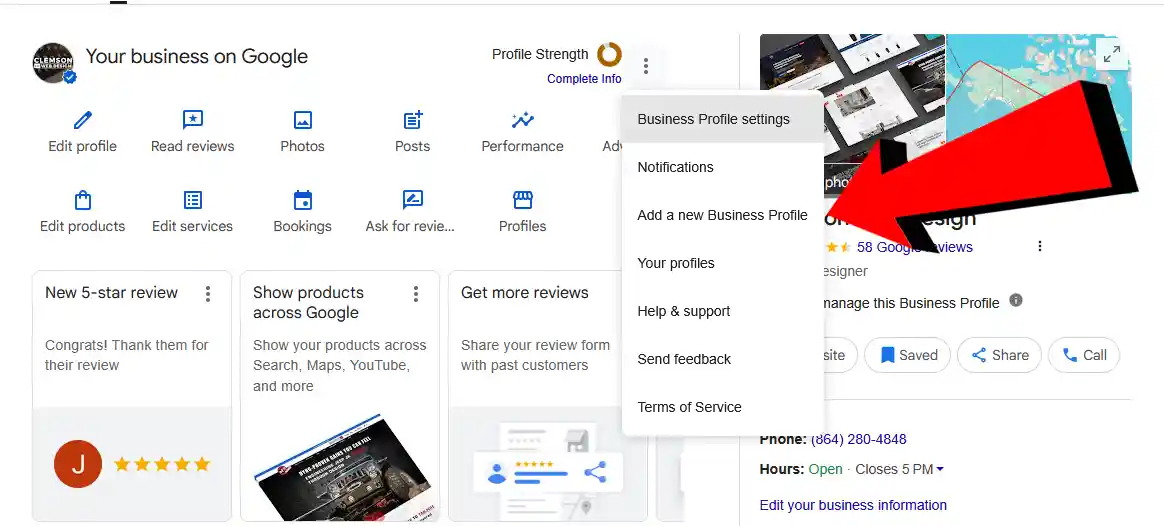
Click “Add business”: In the dashboard, click the three dots (⋯) next to your existing profile, then choose “Add a new business profile”. Or look for the big “Add business” button and select “Add single business”.
Fill In The Details
Go ahead and set this Google profile up by filling in the details.
Business name: Keep it consistent (e.g., “Clemson Web Design”) for clarity.
Address: Enter the full physical address of your new Greenville office.
Phone number: Use a separate phone number for this location (highly recommended—more on this below).
Website: As with any normal Google Business Profile setup. Fill out the business details like your website url, operating hours. Be sure to add any photos and branding.
Submit $ Verify The New Location
Google will ask you to verify the new business location (this is separate from your main location). Normally Googles options to verify include a postcard, video, phone, or email.
A tip for businesses without mail access at the new office. If postcard is the only choice that Google gives, request it, then immediately go to the help form inside GBP (search “verification” → “Postcard didn’t arrive”).
Explain it’s a second physical office with no mail service and ask for video verification instead. Most businesses get approved with a quick video tour of the new location.
You Use a Separate Phone Number
Yes! It’ s almost always for a true and good practice to have a dedicated phone number for a second office. It helps Google see the locations as distinct, will reduce any risk of duplicate flags, and gives customers the right local number to call. For a Seneca business expanding to Greenville, a dedicated 864 Greenville-area line makes you look like a true local player there.
You can forward calls if needed, but list the new number on the profile that the locations stay separate.
To save on cost and setup tie. You can use a VoIP service like OpenPhone, Google Voice for Business, RingCentral, or Grasshopper (~$15–25/month). Choose a local area number. Set it to forward to your main line or the new office phone after hours if you want. Keep it simple, but keep it separate!
Need Google Business Profile Help?
Adding a second Google Business Profile location is easier than most people think and makes a big difference for businesses growing in the Upstate. Whether you’re in Seneca expanding to Greenville or anywhere else in Clemson, Anderson, or Walhalla, getting this right helps you show up where your customers are searching.
If you need consulting or even hands on assistance and help making both location profiles look their best (plus website updates to match), we’ve got you covered.
Clemson Web Design works with local businesses every day on Google profiles, SEO, and websites that actually bring in customers. Ready to get your second location live and looking sharp? Drop us a line or give us a call. We’re local, and happy to help!